
We’re creating a future where more people can use technology to turn ideas into real career opportunities. AI-generated building designs are making that future feel closer than ever. With a simple prompt, artificial intelligence can produce a building concept, floor plan, or visual design in seconds—something that once required hours of skilled work.
But speed is not the same as accuracy.
During a recent discussion at RW2 Career & Technical Education, one of our drafting and design instructors demonstrated how ChatGPT could generate a building design in less than a minute. The result was impressive, and the speed sparked an important conversation: Can an AI-generated design actually be trusted for real-world construction?
The answer is more complicated than simply saying yes or no.
AI can be a powerful tool for brainstorming, exploring ideas, and speeding up parts of the design process. However, professional CADD and Revit skills remain essential for turning an idea into a technically accurate, buildable, and code-compliant design.
This article explores what AI can—and cannot—do in architectural and construction design, why human technical skills still matter, and how learning CADD and Revit can help students prepare for a changing workforce.
What can AI-generated building designs actually do?
AI-generated building designs are computer-created concepts produced from written instructions, images, data, or other inputs. These tools can quickly turn an idea into something visual, giving users a starting point for exploring possible designs.
For someone who has never used professional design software, the results can feel remarkable.
A person might ask an AI tool to create a concept for a small office, home, retail space, or community building. Within seconds, the tool may generate an image or describe a possible layout.
AI can be useful for:
- Brainstorming early design concepts
- Exploring different visual styles
- Generating preliminary ideas
- Creating inspiration for layouts
- Comparing possible design directions
- Helping users communicate an idea visually
- Speeding up repetitive parts of a creative process
This makes AI valuable during the early stages of design exploration.
However, an AI-generated image is not automatically a construction-ready drawing.
There is a major difference between asking, “What could this building look like?” and asking, “Can this building actually be built safely and correctly?”
Professional design requires much more than producing an attractive image.
A trained CADD or Revit professional must think about dimensions, materials, structural requirements, building systems, documentation, construction methods, codes, and the relationship between different components of a project.
That is where human expertise becomes critical.
Can you trust AI-generated designs for real-world construction?
The short answer is: AI-generated designs should not be treated as construction-ready documents simply because they look convincing.
AI is excellent at generating possibilities, but construction requires precision.
A building design must work in the physical world, not just on a screen. A visually impressive concept could contain incorrect dimensions, unrealistic materials, missing structural information, or design elements that do not meet applicable building requirements.
Before a design can move toward construction, trained professionals need to review and develop it.
A professional review may involve:
- Checking dimensions
Measurements need to make sense and correspond correctly throughout the design. - Reviewing building requirements
Designers must consider applicable codes, standards, regulations, and project requirements. - Coordinating building systems
Architectural elements need to work with structural, mechanical, electrical, plumbing, and other systems. - Evaluating constructability
A design must be practical to build, not simply attractive to look at. - Creating accurate documentation
Construction teams need clear technical drawings and information. - Performing quality assurance
Errors must be identified and corrected before they create larger problems.
AI can assist with some parts of this process, but it does not remove the responsibility for professional judgment.
The important lesson is simple: AI can help generate the idea. Skilled professionals help determine whether the idea works.
Why do CADD and Revit skills still matter if AI can design so quickly?
If AI can create a building concept in seconds, it is reasonable for students to ask whether learning CADD or Revit is still worth the effort.
It is.
CADD and Revit skills teach professionals how to work with designs at a technical level. These skills are not simply about drawing lines or creating attractive models. They involve understanding how a design is organized, documented, coordinated, and prepared for real-world use.
CADD Helps Professionals Work with Technical Drawings
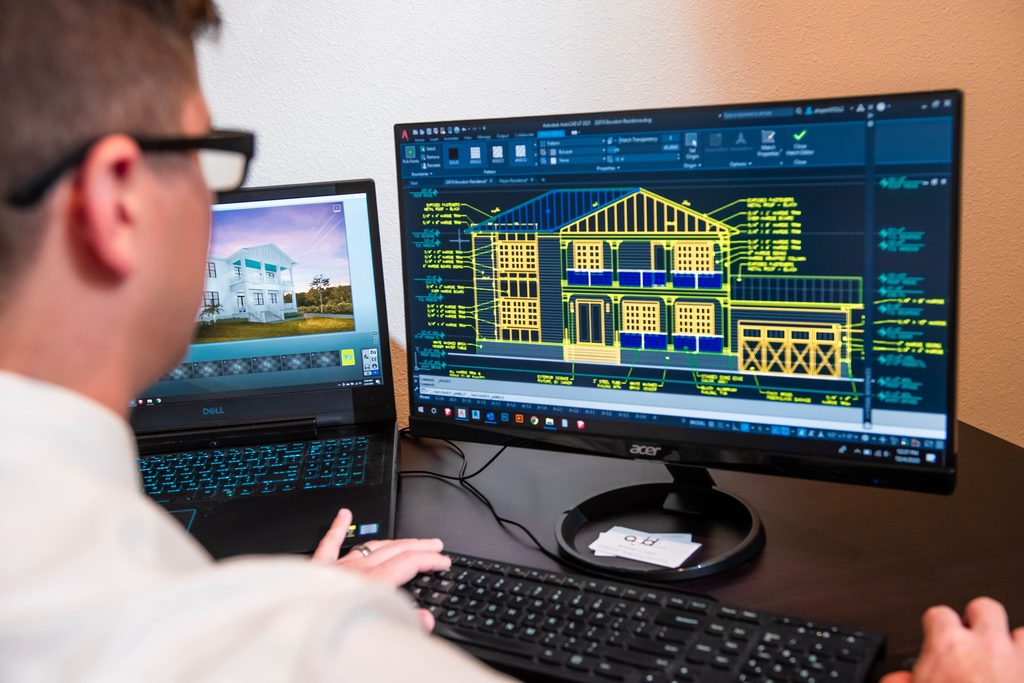
Computer-Aided Design and Drafting, commonly called CADD, is used to create precise technical drawings and documentation.
CADD professionals may work with:
- Floor plans
- Elevations
- Sections
- Site plans
- Construction details
- Technical documentation
- Dimensions and annotations
- Design revisions
The software is important, but understanding why something needs to be drawn a certain way is just as important.
Revit Adds Building Information and Coordination
Revit is a Building Information Modeling, or BIM, platform used extensively in architecture, engineering, and construction.
Instead of thinking about a project only as a collection of lines, Revit allows professionals to work with building elements and information within a coordinated model.
This can help teams understand relationships between components and identify potential problems earlier in the design process.
AI does not make these technical skills irrelevant. In many ways, the emergence of AI makes them even more valuable because professionals who understand the fundamentals can use AI more effectively.
Will AI replace CADD and Revit jobs, or will it change them?
One of the biggest questions students have about AI and design careers is whether technology will eliminate these jobs.
A better way to think about the future is that AI is likely to change how technical professionals work rather than simply eliminate the need for them.
Technology has changed design work many times before.
The move from hand drafting to computer-aided drafting changed the profession. BIM changed how many teams coordinate projects. New software continues to automate repetitive tasks.
AI represents another significant shift.
Instead of spending time on every repetitive step, professionals may increasingly use AI to explore options, organize information, generate preliminary concepts, or speed up certain workflows.
That means future professionals may need both technical knowledge and technology awareness.
The strongest combination may look like this:
- Understand design fundamentals
- Know how to use professional CADD or BIM software
- Understand construction documentation
- Know how to review AI-generated information
- Recognize errors and inconsistencies
- Communicate with project teams
- Apply professional judgment
- Continue learning as technology changes
AI may make some tasks faster, but someone still needs to understand the work well enough to determine whether the result is useful.
How can students prepare for a future where AI and human skills work together?
The future of technical design does not have to be a competition between people and technology.
A more useful question is: How can skilled professionals use technology to do better work?
Students preparing for CADD, Revit, or other technical careers can begin by developing a strong foundation.
Start with the Fundamentals
Learn how technical drawings work and why accuracy matters.
Practice with Professional Tools
Hands-on experience helps turn concepts into practical skills.
Learn to Question AI Output
AI can produce confident answers that still contain mistakes. Treat generated information as something to review, not something to automatically accept.
Build a Portfolio
A portfolio gives learners a way to demonstrate their skills through real examples of their work.
Develop Communication Skills
Technical professionals rarely work alone. They communicate with designers, engineers, contractors, clients, and other members of a project team.
Keep Learning
Technology will continue to change. The ability to learn new tools may become just as important as knowing today’s software.
This is where technical education can play an important role. Training is not only about learning a specific program. It is about developing the knowledge and confidence to participate in a changing workforce.
How does RW2 prepare learners for the future of technical design?
RW2 Career & Technical Education believes technology should create more possibilities for learners—not more barriers to career growth.
That means embracing new technology while keeping people at the center of the learning experience.
RW2 supports learners through career-focused technical education that includes CADD training, Revit-related (for BIM) skills, online, LIVE instruction, career readiness, and portfolio development.
For students exploring technical careers, the goal is not simply to learn software.
It is to build skills that can support long-term workforce participation.
That includes learning how to:
- Apply technical knowledge to practical projects
- Develop confidence through hands-on practice
- Create work that demonstrates growing skills
- Prepare for industry expectations
- Communicate professionally
- Continue learning as technology evolves
- Explore pathways into technical careers
RW2’s next class is scheduled for October 12, 2026, giving learners another opportunity to begin developing technical skills and preparing for future career opportunities.
(Interested in financial aid options? Call 816-875-0111 or email Lynn@rw2.education.)
RW2’s approach recognizes that today’s learners may enter a workforce that looks different from the one that exists today.
AI will continue to develop. Software will continue to change. Employers will continue to look for people who can adapt.
A strong technical foundation gives learners a place to start.

Frequently Asked Questions About AI, CADD, and Revit Careers
Q: Can AI really create a building design in seconds?
A: AI tools can generate building concepts, images, layouts, and design ideas very quickly. However, a fast-generated concept is not the same as a complete, construction-ready design. Professional review and technical development are still necessary.
Q: Can AI replace CADD or Revit professionals?
A: AI may automate or change some tasks, but technical professionals still provide judgment, accuracy checks, documentation skills, coordination, and construction knowledge. Learning how to use professional design tools alongside emerging AI technology can help students prepare for changing workplace expectations.
Q: Do I need experience before learning CADD or Revit?
A: Not necessarily. Training can provide a starting point for people who are new to technical design. The important part is being willing to practice, learn the fundamentals, and build skills over time.
Q: Is Revit difficult for beginners?
A: Revit has many features, so it can take time to learn. Like other professional software, it becomes more manageable when learners receive structured instruction and have opportunities to practice with real projects and examples.
Q: What can I do with CADD or Revit skills?
A: CADD and Revit skills can support career exploration in areas such as architecture, engineering, construction, drafting, BIM, and related technical fields. The specific opportunities available will depend on your skills, experience, location, and employer requirements.
Q: Should I use AI while learning CADD or Revit?
A: AI can be a useful learning and brainstorming tool when used responsibly. Students should use it to explore ideas or ask questions while continuing to verify information through instructors, professional resources, software documentation, and reliable technical sources.
Q: Why is a portfolio important for technical careers?
A: A portfolio gives employers a practical way to see what you can do. For students and career switchers who are building professional experience, examples of technical drawings, models, and projects can help demonstrate developing skills and career readiness.
Q: How can RW2 help me prepare for a technical career?
A: RW2 provides career-focused technical education designed to help learners develop practical skills and workforce confidence. Depending on the pathway, learners can build technical knowledge, prepare for certifications, develop portfolios, and strengthen the professional skills needed to pursue technical career opportunities.
AI Is Fast. Skilled Professionals Still Matter.
The most important lesson from that recent RW2 classroom demonstration may not be that AI can design a building in less than a minute.
It may be that we now have a powerful new tool—and we need skilled people who know how to use it wisely.
AI can generate ideas. It can accelerate workflows. It can help professionals explore possibilities that might otherwise take much longer to develop.
But buildings are real.
People will live in them, work in them, and depend on them. That means technical accuracy, thoughtful decision-making, quality assurance, communication, and professional responsibility will continue to matter.
For students considering CADD, Revit, architecture, engineering, construction, or other technical careers, this is an opportunity to learn both the fundamentals and the technology shaping the future.
At RW2 Career & Technical Education, the goal is to help learners build the skills, confidence, and career readiness to participate in that future.
Technology may change the tools we use. Skilled people will continue to shape what those tools make possible.