Choosing between AutoCAD vs Revit is one of the most common questions asked by people exploring careers in architecture, engineering, and construction (AEC). Both software programs are widely used throughout the industry, but they serve different purposes and support different workflows.
We’re creating a future where more people can discover meaningful technical careers, build valuable skills, and participate confidently in the workforce. Yet many talented individuals face barriers when trying to determine which technical skills will provide the best opportunities for their future.
If you’re considering a career in drafting, design, construction documentation, or Building Information Modeling (BIM), understanding the differences between AutoCAD and Revit can help you make an informed decision.
In this guide, you’ll learn what each software program does, how employers use them, what careers they support, and how RW2 Career & Technical Education helps learners develop industry-relevant skills for today’s workforce.
What Is the Difference Between AutoCAD and Revit?
When comparing AutoCAD vs Revit, the most important difference is that AutoCAD is primarily a drafting tool, while Revit is a BIM software platform used for creating intelligent building models.
What is AutoCAD?
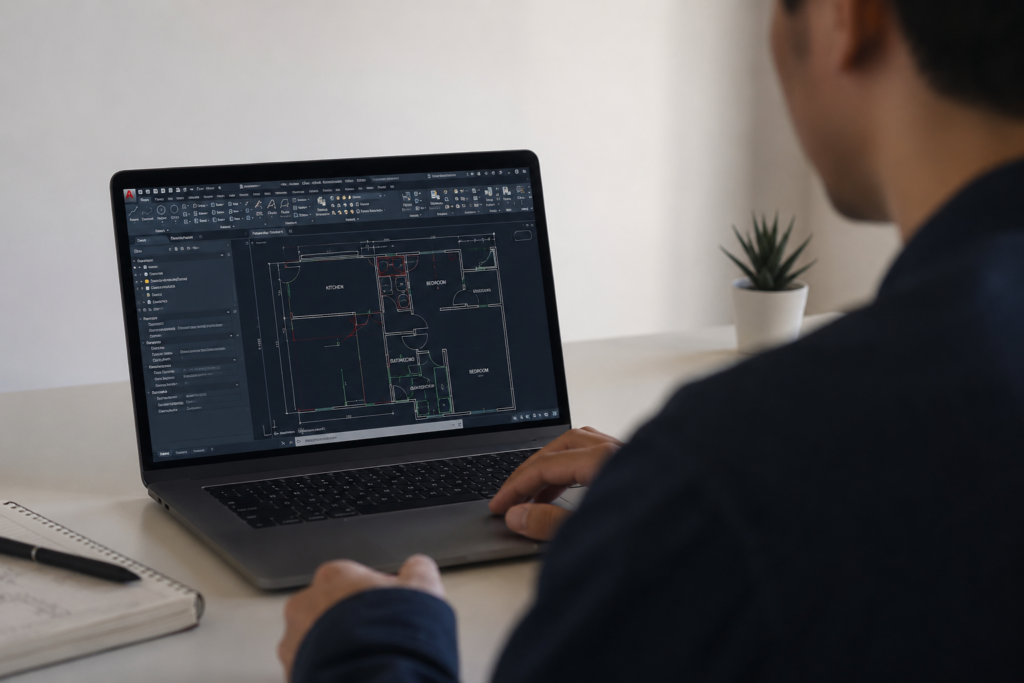
AutoCAD is a computer-aided design (CAD) software developed for creating precise 2D drawings and technical documentation.
Professionals use AutoCAD to:
- Create floor plans
- Draft construction documents
- Design mechanical components
- Produce electrical layouts
- Develop engineering drawings
AutoCAD focuses on lines, shapes, dimensions, and annotations.
What is Revit?
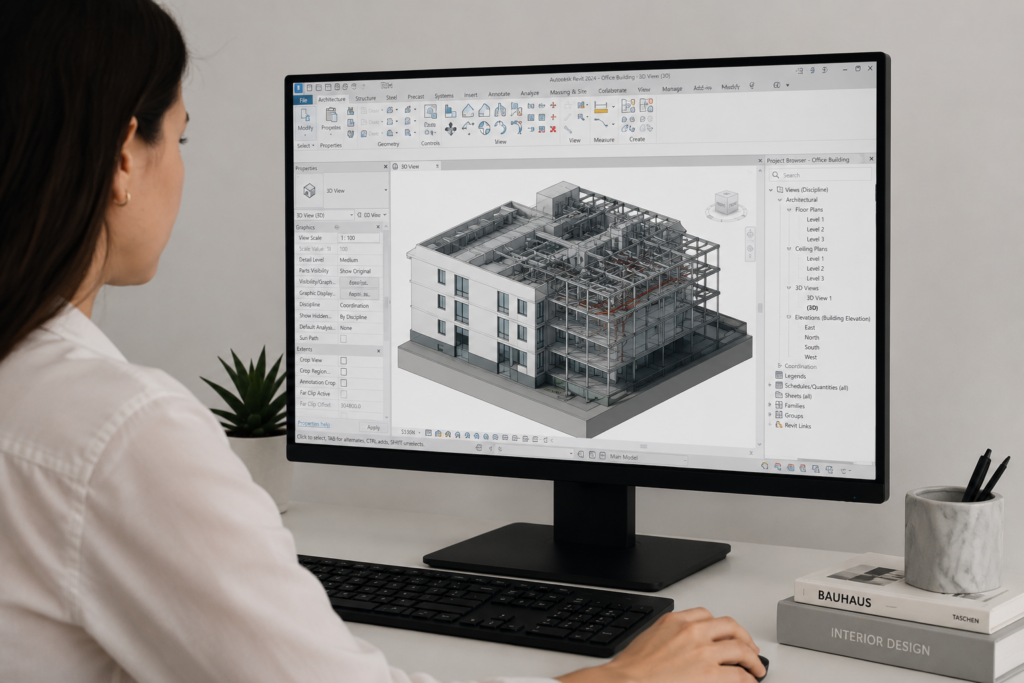
Revit is a BIM software application designed for creating intelligent 3D building models.
Unlike traditional drafting software, Revit allows users to create interconnected building elements such as:
- Walls
- Doors
- Windows
- Roofs
- Structural systems
- Mechanical systems
Quick Comparison
When one part of the model changes, related views and documentation update automatically.
| Feature | AutoCAD | Revit |
| Primary Purpose | Drafting | Building Information Modeling |
| Design Type | 2D and basic 3D | Intelligent 3D models |
| Collaboration | Limited | Highly collaborative |
| Documentation | Manual updates | Automatic updates |
| Industry Use | Broad technical drafting | Building design and construction |
Both skills remain valuable and are often used together in professional environments.
Is AutoCAD or Revit Better for Beginners?
The answer depends on your career goals.
AutoCAD May Be Better If You Want To:
- Learn drafting fundamentals
- Understand technical drawings
- Build foundational design skills
- Enter drafting careers quickly
- Explore multiple industries
Many students find AutoCAD easier to learn initially because it focuses on drawing commands and drafting principles.
Revit May Be Better If You Want To:
- Work in architecture firms
- Enter BIM-focused careers
- Participate in large construction projects
- Create intelligent building models
- Develop future-focused design skills
Because Revit combines design, modeling, and documentation, it can feel more complex at first.
A Smart Approach
Many employers value professionals who understand both platforms.
A common learning pathway looks like this:
- Learn drafting fundamentals.
- Build AutoCAD skills.
- Develop BIM knowledge.
- Learn Revit workflows.
- Create a professional portfolio.
This progression helps learners understand both traditional drafting and modern building design processes.
How Is BIM Software Changing the AEC Industry?
The growing adoption of BIM software has transformed how buildings are designed, documented, and constructed.
What Is BIM?
Building Information Modeling (BIM) is a process that uses intelligent digital models to improve planning, design, construction, and facility management.
Instead of creating separate drawings, teams work from a shared digital model.
Benefits of BIM Software
Organizations use BIM because it helps:
- Improve project coordination
- Reduce design conflicts
- Increase efficiency
- Enhance communication
- Improve construction planning
- Reduce costly errors
Why Employers Value BIM Skills
As more companies adopt BIM workflows, professionals with Revit experience are increasingly sought after.
Employers often look for candidates who can:
- Create BIM models
- Coordinate project information
- Work with multidisciplinary teams
- Produce accurate documentation
- Manage project revisions efficiently
This makes BIM software knowledge an important career asset for many AEC professionals.
What Careers Can AutoCAD and Revit Skills Lead To?
Both software platforms support a variety of career pathways.
Careers That Commonly Use AutoCAD
AutoCAD training can prepare learners for roles such as:
- CAD Drafter
- Architectural Drafter
- Civil Drafter
- Mechanical Drafter
- Electrical Drafter
- Design Technician
These positions often focus on producing technical drawings and construction documentation.
Careers That Commonly Use Revit
Professionals with Revit skills may pursue careers including:
- BIM Technician
- BIM Coordinator
- Architectural Designer
- Structural Modeler
- MEP Designer
- Construction Technology Specialist
Careers That Benefit From Both Skills
Many employers prefer candidates who understand both AutoCAD and Revit because projects often involve multiple software platforms.
Professionals with experience in both areas may have greater flexibility when pursuing career opportunities.
What Do Employers Look for Beyond Software Skills?
While technical skills are important, employers often seek a combination of technical knowledge and professional readiness.
Technical Skills
Employers value candidates who can:
- Read technical drawings
- Follow industry standards
- Create accurate documentation
- Use CAD and BIM tools effectively
- Understand construction workflows
Professional Skills
Successful professionals also demonstrate:
- Communication
- Teamwork
- Problem-solving
- Time management
- Adaptability
- Professional ethics
Portfolio Development
A strong portfolio helps employers evaluate your abilities.
A portfolio may include:
- Drafting projects
- Building models
- Construction documents
- Design exercises
- Technical presentations
This is why practical projects and hands-on learning experiences are often important components of career preparation.
How Can AutoCAD Training and Revit Certification Support Career Growth?
Professional training helps learners build confidence while developing workforce-ready skills.
Benefits of AutoCAD Training
Quality AutoCAD training can help learners:
- Understand drafting standards
- Develop technical drawing skills
- Build foundational knowledge
- Create professional work samples
- Prepare for entry-level opportunities
Benefits of Revit Certification Preparation
Revit certification preparation can help learners:
- Validate technical knowledge
- Demonstrate commitment to professional growth
- Increase confidence
- Support career advancement goals
- Strengthen resumes and portfolios
While certifications alone do not guarantee employment, they can help showcase skills to potential employers.
Continuous Learning Matters
Technology continues to evolve.
Successful professionals often continue developing new skills throughout their careers, including:
- BIM workflows
- Project coordination
- Emerging design technologies
- Industry-specific software
A commitment to learning can create long-term career opportunities.
How Does RW2 Help Learners Build AEC Career Skills?
RW2 Career & Technical Education supports learners who want to explore technical careers and participate confidently in the workforce.
Flexible Online Learning
RW2 provides online instruction designed to help learners build skills while balancing other responsibilities.
This flexibility can be especially valuable for:
- Adult learners
- Career changers
- Working professionals
- Parents supporting students
Industry-Aligned Skill Development
Learners gain experience with skills used throughout the AEC industry, including:
- Drafting fundamentals
- CADD workflows
- BIM concepts
- Technical documentation
- Project-based learning
Career Readiness Focus
RW2 emphasizes more than software training.
Learners also develop:
- Communication skills
- Teamwork experience
- Professional confidence
- Portfolio projects
- Workforce readiness
Building Opportunity
Many talented individuals face barriers to education or career growth despite having the potential to succeed in technical fields.
RW2’s mission focuses on creating opportunity, belonging, voice, and participation while helping learners build pathways toward meaningful careers.
Frequently Asked Questions
Q: Is AutoCAD harder to learn than Revit?
A: Many beginners find AutoCAD easier because it focuses on drafting and drawing tools. Revit involves both design and BIM concepts, which can create a steeper learning curve. However, both skills can be learned with consistent practice and instruction.
Q: Can I learn Revit without knowing AutoCAD?
A: Yes. Many learners start directly with Revit. However, understanding drafting principles can help make the learning process smoother.
Q: Which skill is more in demand today?
A: Demand varies by employer and industry sector. Many organizations increasingly seek BIM software experience, while AutoCAD remains widely used across architecture, engineering, manufacturing, and construction.
Q: Do employers expect candidates to know both AutoCAD and Revit?
A: Some positions require only one platform, while others benefit from knowledge of both. Learning both skills can increase flexibility and career options.
Q: Can adults switch into drafting or BIM careers?
A: Yes. Many professionals successfully transition into technical careers through structured training, skill development, and portfolio building.
Q: How long does it take to learn AutoCAD?
A: Learning basic AutoCAD skills may take several weeks or months depending on study time and practice. Developing professional-level proficiency typically requires continued project experience.
For learners looking for a structured pathway, RW2 offers a 14-week Computer-Aided Drafting and Design (CADD) program that helps students build foundational drafting skills and gain hands-on experience with industry-relevant tools and workflows.
Q: What is BIM software used for?
A: BIM software is used to create intelligent digital building models that improve design coordination, documentation, construction planning, and project collaboration.
Q: Does RW2 help learners prepare for technical careers?
A: Yes. RW2 provides industry-aligned training, certification preparation support, project-based learning, portfolio development, and career readiness skill-building to help learners prepare for workforce participation.
Looking Toward Your Future in AEC
The decision between AutoCAD vs Revit does not have to be an either-or choice. Both skills play important roles in today’s AEC industry, and understanding their strengths can help you make informed decisions about your career path.
We’re creating a future where more people can discover their potential, build confidence through technical education, and participate fully in meaningful careers. Whether you’re a student exploring your first career direction, an adult learner pursuing a new opportunity, or someone seeking a pathway into architecture, engineering, or construction, developing technical skills can open new possibilities.
If you’re ready to take the next step, RW2 offers year/round Computer-Aided Drafting and Design (CADD) and Revit for BIM classes. These programs are designed to help learners build industry-relevant skills, gain hands-on experience, and prepare for opportunities in the AEC field.
Interested in learning more? Complete the General Interest Form at https://bit.ly/4uaFM7D to receive additional information about upcoming training opportunities and enrollment details.
The journey starts with curiosity, learning, and a willingness to grow. By exploring drafting, BIM software, AutoCAD training, and Revit certification pathways, you can take meaningful steps toward a future where your skills, voice, and participation help shape the built environment around us.